



|
|
|
|
 |
 
|
 |
BMW Garage | BMW Meets | Register | Search | Today's Posts | Mark Forums Read |
 |

|
BMW 3-Series (E90 E92) Forum
>
How to take proper pictures flaunting Angel eyes?
|
 |
| 01-20-2013, 03:11 PM | #1 |
|
Captain

72
Rep 838
Posts |
How to take proper pictures flaunting Angel eyes?
Hey guys. Im completely new to car photography. I recently got my new LCI halogen headlights installed on my car and went to go take a couple pics. Sadly, almost all of them came out blurry or with the actual headllights being to bright for the camera thus making the headlights a rectangle of light. What settings should I use to take proper pictures that capture the angel eyes properly?
Camera is a sony alpha Example of one of my pictures below 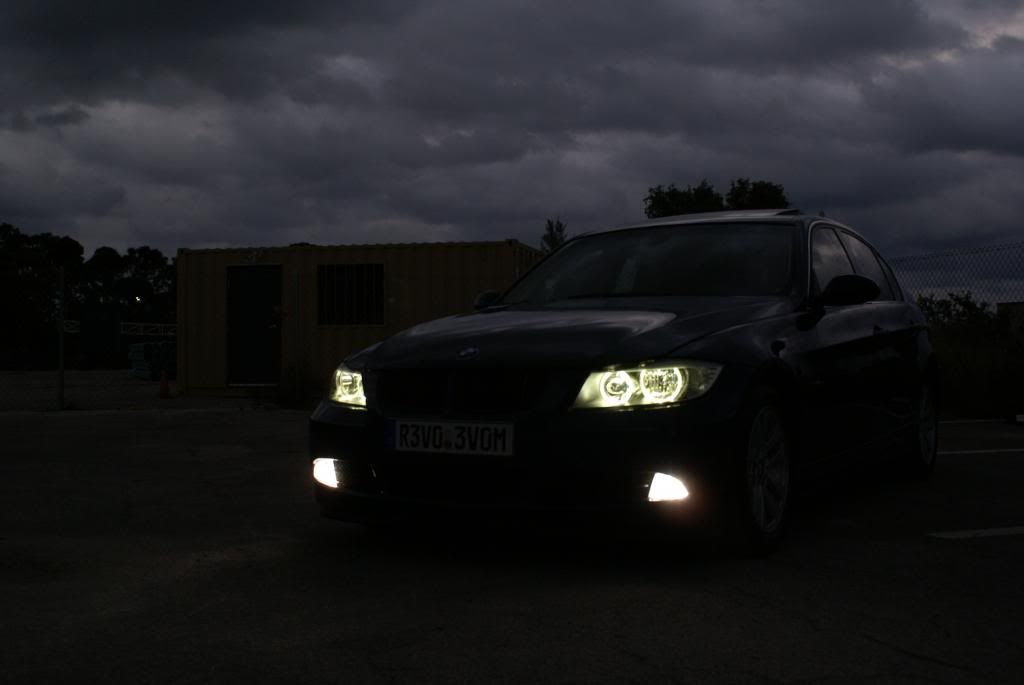 |
| 01-20-2013, 04:20 PM | #2 |
|
Chief Senior Executive Managing VP of Orange Sales
585
Rep 2,581
Posts |
I definitely would say use a fast shutter speed and/or a tripod. Also if you want the car to come out and not be pitch black, take the photo just after sunset, or in a shady area.
Your shot looks a bit blurry from camera shake, most likely due to a too-slow shutter speed. Edit: on second look, it might just be JPEG downsampling. I am no expert (just tried this for the first time a few days ago when I got my new car) but here is my version with settings. It was actually taken in the morning, but it was in a shady wooded area and I essentially exposed for the background. The car is still pretty dark but the lights came out nice, I think. You can always bring up the rest of the car in post processing and brighten it, or take two shots and combine them. You'd need a tripod for that, of course. 1/400 shutter F/4 ISO 100 24mm 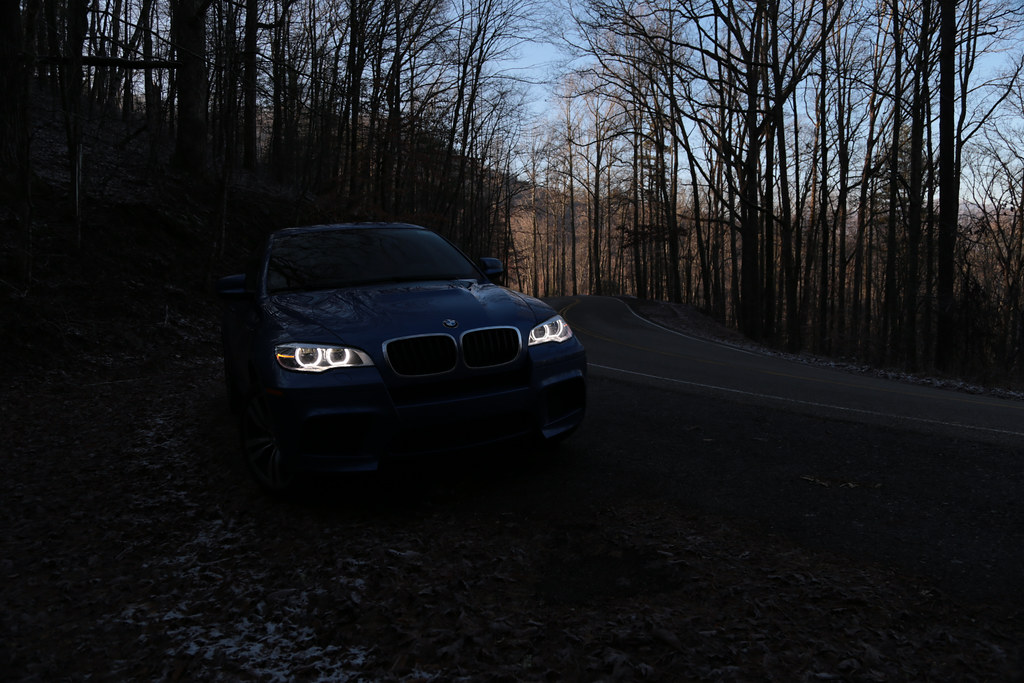 This one also came out OK, but was a slower shutter to get more surrounding light in. I do like the lights in the first one better, though: 1/25 shutter (17mm lens though so not a huge issue) F/11 ISO 800 17mm  Last edited by ddk632; 01-20-2013 at 06:22 PM.. |
|
Appreciate
0
|
| 01-20-2013, 07:47 PM | #3 |
|
Brigadier General
2609
Rep 3,535
Posts |
The best way to do it is to take two separate exposures from a tripod and layer them together using layer masks in Photoshop or whatever editor you use. One exposure for the car, one exposure for the lights.
Barring that, shoot in RAW and just play with the sliders, cranking the highlights way down, and crank the shadows way up, but that will make for a noisier file. |
|
Appreciate
0
|
| 01-21-2013, 03:00 AM | #4 |
|
misadventurer


57
Rep 708
Posts |
I use an a35 and my brother's a57. you can try a few things:
If you use a slow shutter speed use a tripod. If you don't use one try to go faster than 1/80. If you need to bump up the ISO go up but if you go 800 or above depending on your camera it might be too noisy. For what you want to make you need to find the right amount of lighting to fall on your car and the ideal f/stop for the brightness of your lights. The higher your f/stop the sharper the lights will be but the darker the picture will get. I am not an expert so if anyone spots a mistake on my advice feel free to make some corrections.  have fun!
__________________
325i I SP
 |
|
Appreciate
0
|
| 01-21-2013, 11:40 AM | #5 | |
|
Major General
464
Rep 6,798
Posts |
Quote:
Essentially, it's HDR with two exposures... but, you can also do even more if you want (3, 5, 7 exposure shots). Then, you can use something like Photomatix to blend it all in, or Photoshop.
__________________
|
|
|
Appreciate
0
|
 |
| Bookmarks |
| Thread Tools | Search this Thread |
|
|